Translate

Thursday, November 21, 2019

Types of Data Types


Data Types
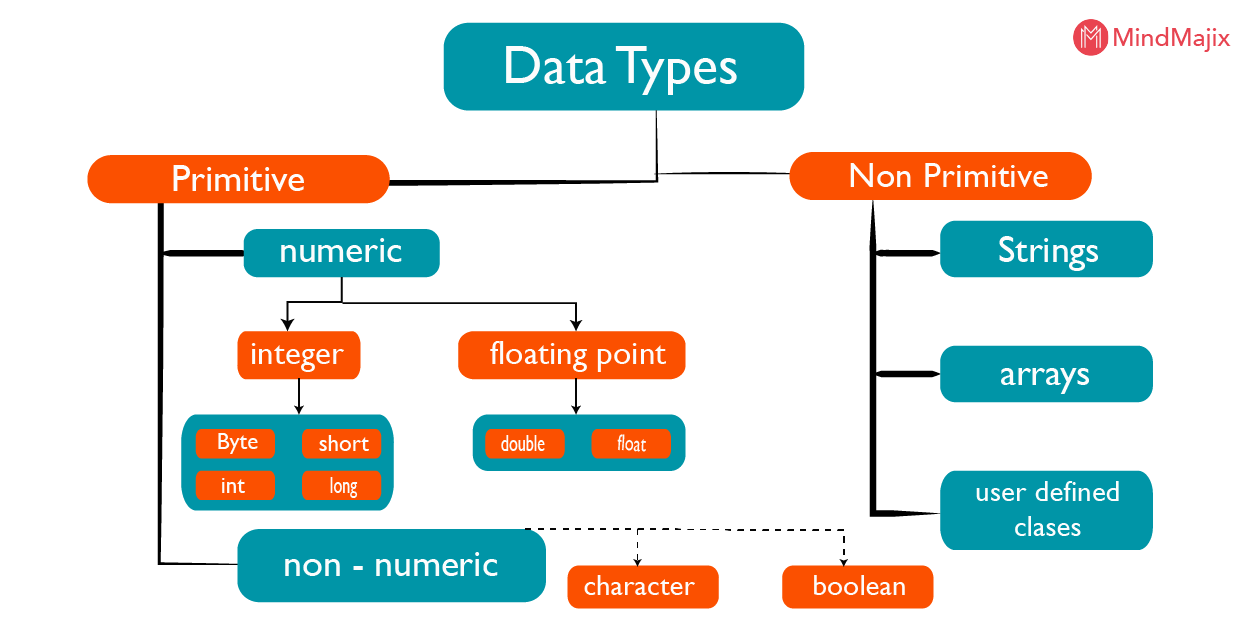
     Data type is a group that has certain types. In other words, data type is a method used to determine the type of data, another word for this is "variable declaration". In programming languages ​​have many types of data types that can be used. But every programming language has data types that might not exist in other programming languages. But in general, in any programming language recognize these 5 data types, namely integer, float, char, string, and boolean. Each of these data types has their respective uses. Therefore, if during data processing there are data that have different data types, then conversion must be done first. Following are explanations of the four data types.

     Integer, this integer data type is used to declare data / variables as integers. For example, values ​​10, 7,29,100, and 22. The use of integer data types is usually used for data that will be operated by addition, subtraction, division, or multiplication.
Float, like integers, this data type is used for numeric data, but for numbers / values ​​in the form of fractions. So if you want to get the best results in a number operation process, then you can use the float data type. For example the values ​​of 1.5, 3.5, 3.14, and other other fractions.
Char, char is the data type used for variable declarations in the form of characters. These characters can be symbols, alphabet, or numbers.
Strings, specifically for strings, the data type used to declare data that contains sentences or words. Boolean, this data type is very different from the others. Because this boolean data type is only used for data that has 2 values ​​only, namely true or false.

Types of Data Types
 A.Primitive Data Types (Simplified)
     Primitive data types are basic data types that can only store one type of value in one variable.
This data type is often used by programmers because it is easy to use and is the same as other
programming languages.Some examples of primitive data types that are often encountered are
numeric types (integer, real /  float), characters (char), rows of characters (strings) and booleans 
(True or False).

 B.Numeric Data Type
    Numeric Data Types are numeric data types, which are divided into integer and real / float data types:
1. Integer
      Integers are data types in the form of integers. The range is as follows:
                             | Data Type |     Size     |      Place Value Range
                                  Bytes         1 byte               0 to +255
                                Shortint       1 byte              -28 to +127
                                 Integer        2 bytes         -32768 to 32767
                                  Word         2 bytes             0 to 65535
                                 Longint      4 bytes     2147483648 to 2147483647

2. Real / Float
      Real / Float are fractions or numbers.
                          |   Data Type   |   Size   |      Place Value Range
                                  Real         6 bytes     2.9 x 10-39 to 1.7 x1038
                                Single        4 bytes     1.5 x 1045 to 3.4 x 1038
                               Double        8 bytes    5.0 x 10-324 to 1.7 x 10308
                             Extended     10 bytes    3.4 x 10-4932 to 1.1 x 104932
                               Comp          8 bytes    -9.2x 10¹⁸ to 9.2x 10¹⁸

3.Character Data Type (Char)
     Char Is a data type that only stores one digit number or letter.
   Examples of uses are:
=> Character letters: ‘a’ .. ’z’, ’A’ .. ’Z’
=> Number characters: ‘0’ .. ’9’

4.String Data Type
     String is a data type in the form of a row of characters both numbers, letters and symbols.
   Example string: 
=>"P3rk3n4lk4n, N4m4 $ 4y4 R @ n66 @ _ $ @ reza @."

5.Boolean Data Type
     Boolean is a logical data type, which only recognizes two values ​​1 or 0, True or False, Dark or         Light, True or False. In its use, Boolean only uses the least memory.


C. Composite Data Type
     Composite is a data type that can store many values ​​with different types. Examples are as follows:
       *Array
           Array or array is a structured data type that is able to store a lot of data but with the same type (homogeneous). Here is an illustration of the Array of friends on campus:
            -Manarul
            -Rizky
            -Aditya
            -Furqon

Record or struct
      Records are known in Pascal while Struct is in C ++. Records are almost the same as arrays, but the difference is that this data type can store a lot of data with different types (heterogeneous). The   following illustration illustrates the name and class of friends on campus:
   =>Manarul 4 B
   =>Rizky 2 A
   =>Aditya 4 C
   =>Furqon 2 A

D.BLOB
       BLOB is a data type that stores binary numbers. So in principle, images that are normally stored on a computer actually have binary values ​​and can then be accommodated in this data type. Not only images, music files, videos, documents and others can also be stored in the BLOB data type.

Date Time
   Date Time is a type of data that stores date (time), time (time) or date time (date and time) with a   specific format, Example:

Date: 2017-March-24
Time: 20:51
Date Time: 2017-03-24 20:51
The object
Object is a data type that stores the values ​​of objects provided by GUI-based programming such as Visual Basic, Delphi and others.
Example:
Object: Commond Button
Name: cmdsave
Value accommodated: Save Data
Enumeration
Enumeration is a data type that has elements in certain order and range. Each element is represented by a number in its order (index), then each index contains a value written in parentheses.
As an example :
Data type: day_in_week
Index: 0,1,2,3,4,5,6
Value: Monday, Tuesday, Wednesday, Thursday, Friday, Saturday, Sunday
The following illustrations are: (0) Monday, (1) Tuesday, ... (6) Sunday

Some of Teknoborneo's experiences in using a number of programming languages ​​such as (C, C ++, Visual Basic, Delphi, Java, PHP) as well as databases such as (Microsoft Access, MySQL, SQL Server, Oracle) turned out to be different types of data loaded both in name and amount. The more new programming languages ​​or databases are used, the more types of data types are also available.
As an example :
In Microsoft Access the mention of the String data type is Sort Text / Long Text while in MySQL it is Varchar.
In Access 2016 there are 12 known data types, while in MySQL there are 39.

Tuesday, November 19, 2019

Top 5 C++ Editor Text


     Programming Language is a number of commands or instructions (can be one instruction or many) that are used to carry out certain functions and tasks to solve a problem. Programming languages ​​are often also referred to as computer languages ​​because memag is run by a computer. In addition to computer language, often also referred to as coding (Coding), code (code) or listing program (source code). To learn programming, usually use a text editor, a programming language, or known as an IDE programming according to the language needed.

     People who write or make programming are usually known as Programmers, or also Coder (coding writers), while the activities of writing programming languages ​​are usually known as Coding, Programming, Programming etc. Whereas the programming language written by the Programmer when Coding is known as Program, source code and program listing.

     To study or learn programming languages ​​we usually need various tools in the form of editors or places to write programming languages. In general, each programming language has a special IDE and there is also an IDE or text editor for several programming languages ​​at once.

Editor Text of C / C ++ Programming Language
     For those of you who want to know the IDE for C and C ++ languages, here I present. Hope you can help all friends. Text editors of the C and C ++ programming languages are frequently used.

1.Dev C ++
     As the name implies, of course this one IDE pliers application is indeed focused on C and C ++ programming. This application is free to install. Dev C ++ is lightweight to run on computers with a minimum of 2 GB RAM. Dev C ++ is one of the most popular C ++ IDEs among programmers. But also note that this application was last updated in November 2016, so you need to think about choosing it.

2.Eclipse
     Eclipse is one IDE that is multi-platform and makes it an IDE for many programming languages at once. Eclipse is not only for C or C ++ but also applies to Java, PHP and Android. This application is updated regularly every year. So, there is no doubt about the use of eclipse, besides it's free to be used by anyone. System needed to run Eclipse:

-At least 2 GB RAM
-At least 1 GB of storage space

While the system recommended by the admin is:

-4GB RAM with SSD storage
-8GB RAM for HDD storage
-8th generation Intel processor (may be i3, i3 or i7)

3.NetBeans
     If you hear the word NetBeans, maybe a lot of people remember Java, that's right. NetBeans was originally an IDE for java, but as technology develops, NetBeans can now be used for IDE C / C ++ programming.
Minimum certification required:

-2 GB RAM for 32 bit computers and 4 GB RAM for 64 bits
-6GB of storage
As for good performance you need a minimum of 4 GB RAM for SSD storage or 8 GB RAM for HDD.

4.Visual Studio Code
     Visual studio code is a multi-platform IDE made by Microsoft. Apart from the free IDE it is also open source and available for Windows and Linux. Visual studio code can be used for many programming languages at once.
In general, VSCode is more widely used in web programing editors such as PHP, JavaScript and others.
To run perfectly, this application requires at least the following specifications:

-2GB RAM
-1 GB of storage
For the same recommendation as in the Eclipse section that I have already described above. Keep in mind, the specifications that I show can be different from the official website.

5.Visual Studio
     Visual Studio is a flagship editor made by Microsoft. This application is certainly very powerful in terms of debugging. Visual Studio is basically a paid IDE, but we can enjoy it for free by choosing the Community package.
Visual Studio supports a lot of programming languages including C, C ++, Visual Basic, Java, Python, Android and many more.
Not recommended for those of you who have poor computer specifications, because Visual Studio requires a large resource to work well.
The minimum specifications required by Visual Studio are

-4 GB RAM with SSD storage or 8 GB RAM for HDD
-Processor with a speed of 1.8 Ghz
-50 GB of storage only if you install Visual studio or if Full requires 210 GB - 500 GB of storage.
-Surely with the latest operating system, friends, be it Win 7, 8, 10 is the latest.
HD resolution.

Process of Forming C++ Program


Process of Forming C++ Program

     Before proceesing further to the stage of making program code you should know in advance about the process of forming programs in C ++. There are several stages that occur during the process of forming a program, from program code to binary files that can be executed. In the Windows operating system, the program file will have an .exe extension. In Linux, usually the formation of a program is marked with the extension. Each stage is carried out by another different program, which is:

1.C ++ Prepocessor
2.C ++ Compiler
3.Assembler
4.Linker
5.After the program (.exe or .o file) is formed, the file can be executed or run (Run). The program that executes this file is called the Loader program.

C++ Preprocessor Program
     When forming a program written in C ++, the program code will first be processed by the C ++ Prepocessor program. This program will combine the program code with the prepocessor directive used in the code. Prepocessor directive is a program statement that starts with #.
     At this stage, the #include, #define, etc. statements will be converted into the actual code. For example, if there is a #include in the program code the entire contents of the "iostream" file will be included in the program code. Furthermore, the expanded code form is then ready to be sent to the C ++ Compiler program.

C++ Compiler Program
     The next step after the initial processing of the program code is the translation of program code into assembly code. The process at this stage is carried out by the C ++ Compiler program. Code that has been changed to the form of assembly code is then ready to be sent to the Assembler program.

C++ Assembler Program
     After the Assembler program receives the shipment in the form of assembly code from C ++ Compiler, this program will directly translate the code contained in it into object code. Furthermore, this object code will be sent to the Linker program.

C++ Linker Program
     If the program code we write is more than one file, the object code generated will also correspond to the number of program code files. At this stage, the Linker program will link all the object code files with the Standard Runtime Library that has been provided by C ++, then convert them into one .exe file (or. O). This file is called a program. At this stage, the formation of the program has ended.

C++ Loader Program
    Program Loader is a program used to execute programs that we have created. For example, in the Dev-C ++ application (IDE and C / C ++ Compiler that I use), when we use the Compile menu, Dev-C ++ will do the process of forming the program. Here what will be called are C ++ Prepocessor, C ++ Compiler, Assembler, and Linker programs. However, when using the Run menu, the Loader program will be called to execute the program that we have created so that the output of the program will be displayed on the monitor screen (console).

Monday, November 18, 2019

C++ Standarization


C++ Standarization

      C++ is standardized by two bodies, namely the International Standards Organization (ISO) and the International Electrotechnical Commission (IEC). Since its inception, C++ has undergone several standardization processes. In each version, the C++ language has undergone several standardization processes. In each version, the C++ language is always revised; can be in the form of adding new keywords, new behavior, adding a new library, or simply refining / refinement of existing features in the previous version.

C++98 (Standard C++ 1998)
     The first standardization of the C++ language was carried out in 1998, under the name ISO / IEC 14882: 1998. The standard name is then better known as C++ 98. C++ languages that existed before C++ 98 are often referred to as classic C++, which do not yet have facilities such as namespaces, exception handling, templates, RTTI, and others. At that time, the popular C++ compiler used was Borland C++ and Turbo C++.

C++03 (Standard C++ 2003)
     The second standardization was carried out in 2003, under the name ISO / IEC 14882: 2003 standard. The standard name is then known as C++ 03. This version is only a form of refinement or error repair of C++ 98 so that C++ is still considered as C++ 98.

C++11 (Standard C++ 2011)
     On August 12, 2011, C++ was revised and re-standardized under the name ISO / IEC 14882: 2011. This C++ standard is known as C++ 11, but many also prefer to call it C++ ox. In C ++ 11, quite a lot of features are added to C++ 03, both in terms of language (adding keywords), as well as adding libraries. New features include multithreading facilities, tuples, extended form of repetition for, nullptr, and others.

C++14 (Standard C++ 2014)
     The next standardization was released on 15 December 2014, under the name ISO / IEC 14882: 2014, which became known as C++ 14 (or C++ 1y). This version is a (bug fix) of C++ 11 with a few added features.

C++17 (Standard C++ 2017)
     The last standardization was carried out in December 2017, under the name ISO / IEC 14882: 2017. This version is known as C++ 17 (or C++ 1z). In C++ 17, there are many new features added to the C++ 14 language.

Saturday, November 16, 2019

Relationship between C++ and C

Relationship between C and C++ Languages 

       
Previously, C++ was an extension of the C language. In other words, C++ was a superset of C. In C language, the sign ++ was an increment, which is the process of adding value by 1. Thus, C++ means C+1. The value 1 here symbolizes support for object-oriented programming. As such, C++ is a C language that is supplemented by capabilities or support for object-oriented programming. Everything that can be done in C, can also be done in C++. However, this does not apply otherwise. Thus, all C++ compilers can be used to compile program code written in C language. However, you cannot compile program code written in C++ using C compiler.
        Knowledge of C language is very helpful for you in the process of learning C++. However, you don't need to force yourself to learn C language first to work with C++. By learning C++, you are actually also indirectly learning C. C and C++ are very popular languages in the software industry. Both are classified in middle level languages. Today, both languages are also widely used in academic environments as a tool for teaching the basics of programming (algorithms, data structures, and object-oriented programming). According to Bjarne Stroustrup (creator of C++), C was taken as the basic language of the formation of C++ for the following reasons:
- Can run with low level languages
- Walk wherever and for any problem
- Runs smoothly in the UNIX operating system

History of C++


What is C ++? 

    C++ is one of the popular programming languages that has been proven to be widely used by practitioners and scientists to develop large-scale programs (applications), such as games (computer game programs, programs for research in science, embedded systems, etc. In fact, C++ can also be used to develop web-based applications.There are several web frameworks that can be used for these purposes, including:
 - Crow (https://github.com/ipkn/crow)
 - CppCMS (http://cppcms.com/)
 - TreeFrog (http://www.treefrogframework.org/)
 - Silicon (http://siliconframework.org/)

       Although currently there are many new programming languages, but in reality C++ still occupies the top three of the languages most widely used by programmers, in addition to the C & Java languages.

A brief history of C ++
        At first the computer language was used to assist in doing telemetry calculations. At that time, the language used was very primitive because it was still a machine language that only knew numbers 1 and 0. Furthermore, the machine language was simplified into a language that was somewhat understood by presenting special commands called mnemonic terms such as ADD, MOV, JMP and other. This language is called Assembly language which is still included in the lower level languages.
        In 1969, the Bell AT&T laboratory in Murray Hill, New Jersey used this Assembly language to develop the UNIX operating system. The intention is to make an operating system that can be "programmer-friendly". After UNIX was running, Ken Thompson, a system developer in the laboratory, developed a new programming language named B. The letter B was taken from BCPL. Language B is then used to rewrite or revise the UNIX operating system. Because this B language is an interpreter and is slow, in 1971, the UNIX operating system was then rewritten using C language, a programming language developed by Dennis Ritchie, a system developer in the same laboratory.

      Until now C language is still used to develop programs, especially those related to hardware access, microcontrollers, and operating system programming. Linux and Windows are examples of operating systems developed using the C language. That is the reason that makes the C language so popular in the software industry. But unfortunately C language is a procedural language (oriented to the formation of functions). If the program being developed has started to be large, the design of the program becomes complicated and a lot of code must be made. To simplify the design, in 1979, a doctor named Bjarne Stroustrup who at that time also worked in the same laboratory began designing a new language that supports object-oriented programming, but still carried the capabilities of the C language. Initially, the language was named " C with classes ". Then, in 1983 the name was changed to C ++, which means increment of the C language.